Alignment
Two instruments with the same name and different jobs:
- Align — two microphones on one source, made to arrive together. A kick drum with a mic inside and one outside; a snare top and bottom; a guitar cabinet with a dynamic and a condenser on it. Its own ROW on the Analysis chip (alongside FBS and HRP, which share the same chip), because it is a channel-level instrument.
- Speakers — the loudspeakers in the room, made to arrive together. The delay stack under the balcony, the front fills, the delay towers. It lives in the PA Setup tab, alongside Room — Speakers and Room are PA setup, not channel processing, so they share one tab, last in the strip, under a numbered strip that names where you are in the procedure: Aligned → Positions → Modes confirmed → Proposals → Applied → Re-swept. Each step lights once the fact behind it is true — a measurement taken, two or more mic positions added, a mode confirmed, a cut proposed, applied, and re-measured — so the whole PA setup reads as one flow rather than two unrelated panels.
They are the same measurement pointed in opposite directions, and both are answered with a delay and, where it applies, a polarity flip.
Neither of them is the delay tab beside them. That one is the musical effect — feedback, wet and dry, ping-pong. Alignment is fully wet, has no feedback, and is applied before every tap point in the chain.
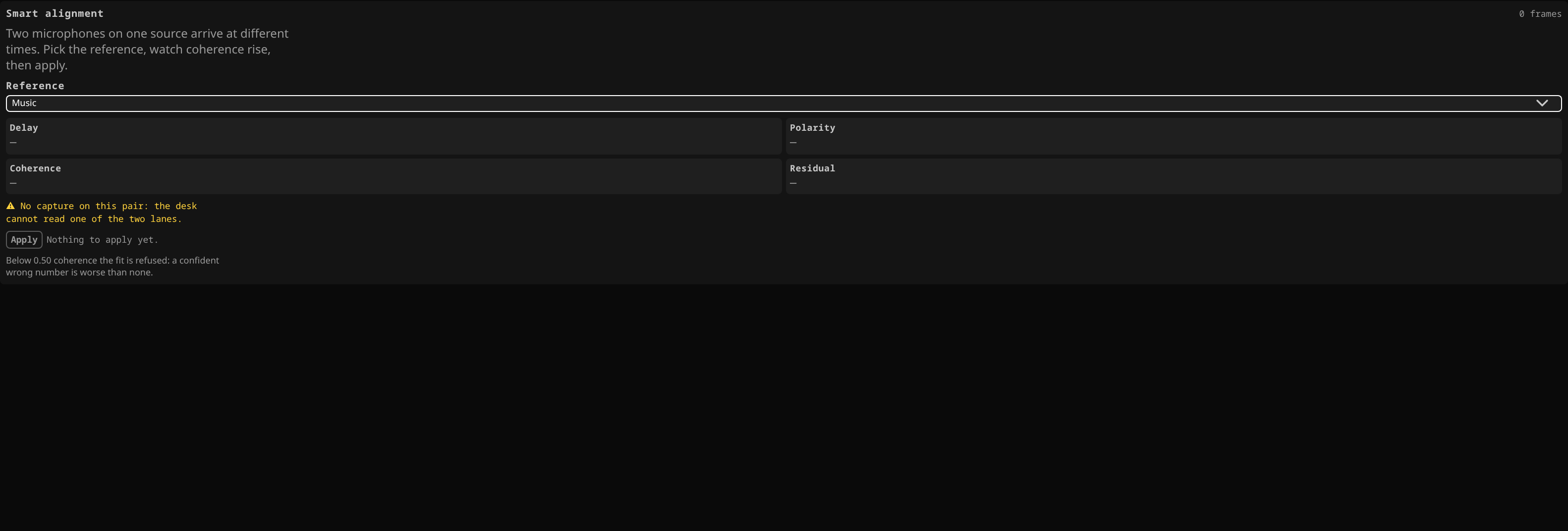 The Align tab with channel 2 picked as the reference and no measurement taken yet: the picker holds the reference, the four readouts wait for the first capture, and the delay stays at zero until you apply one.
Align — two microphones on one source
Pick the reference — the other microphone on that source — and read four numbers. Only input channels are offered as a reference: alignment is a relationship between two microphones on one source, and a bus is many sources summed.
| Number | What it is |
|---|---|
| Delay | How much later this microphone should be pushed, in milliseconds, to land with the reference. This is what gets applied. |
| Polarity | Whether this microphone should be flipped. Also applied. |
| Coherence | Whether to believe the other two. Low coherence means the two microphones are not hearing enough of the same thing for the measurement to mean anything. |
| Residual | What the delay and the flip did not explain. A small residual means the pair really is just offset in time; a large one means something else is going on. |
There is no phase-against-frequency curve, on purpose. Every number here is a single value you act on, and a dense plot on a touchscreen during a show is not something anybody reads.
Below 0.50 coherence the fit is refused and the panel says so — a confident wrong number is worse than none.
The measurement runs because the panel is open. Opening it arms the desk to measure this pair and no other; closing it stops. Nothing is measured that nobody is looking at.
Nothing is applied until you press APPLY. The analyser never writes by itself. It shows what it found and waits. Pressing APPLY spends it: the delay onto the channel's alignment delay, the flip onto the channel's ordinary polarity switch — the same one you would reach for by hand.
Pressing APPLY a second time on an aligned pair does nothing further: the correction is already in, and the measurement now reads near zero because the pair is aligned. That is the check, not a bug.
When it refuses
Every refusal is named on screen rather than left as a silent failure:
- the measurement is stale — nothing has been heard close enough in time to trust;
- coherence is too low — the two microphones are not hearing the same source;
- the reference is this channel — a channel cannot be aligned to itself;
- no shared energy — one of them is silent;
- no capture / no reference — one of the two is not patched.
A pure sustained tone is not a valid test signal. A sine wave is the same at every period, so "how much later" has no single answer. Use the real source: a played instrument, a voice, programme material.
Re-align all re-runs the measurement on every channel that already names a reference — the soundcheck gesture: set the references once, then re-align after anybody moves a microphone. It never invents an alignment for a channel that has no reference.
It runs several passes per channel rather than one, and that is not caution for its own sake. A single fit under-reads by a few per cent, because the delay costs some overlap between the two analysis windows. Each pass then works on a smaller remainder where that bias is smaller, and the error falls roughly twenty-fold each time — measured on a real pair as 4.748, then 0.236, then 0.015, then 0.000 ms. It stops as soon as the correction it would apply is negligible.
Alignment is per channel and is saved with the show. Load a show that never had one and the alignments are gone with it, which is correct: they belong to a microphone placement, not to a desk.
Speakers — the loudspeakers in the room
Offered on outputs that feed a box. A measurement microphone stands in the room, each loudspeaker is measured against its own feed, and the delay that makes them arrive together is offered per box.
A loudspeaker is one box on one socket. A mix reaches its destination through one leg, and that leg's sides land on their own sockets — MAIN's left box on one, its right box on another. Each side is its own row here, measured on its own and corrected on its own: aligning the near box does not move the far one. The reference is a box too, so the picker beside the reference output asks which one everything else is matched to.
Three numbers per loudspeaker:
| Number | What it is |
|---|---|
| Arrival | How long the sound takes to get from the console to the microphone — the flight through the air plus everything in the signal chain. |
| Coherence | Whether to believe it. |
| Residual | What the delay does not explain. Mostly the room. |
Two rules that are enforced, not suggested
A measurement microphone in front of the PA and routed back into it is a feedback loop. The desk refuses to measure while that channel is assigned to MAIN or holds any send, and it says which one is in the way. Clear the assignment and the send, then measure. The panel repeats the instruction because you are the one who has to clear it — but the refusal is where it cannot be skipped.
One loudspeaker at a time. A microphone hears the sum, so the procedure is: mute everything but one, measure it, move on. Every box's row is on screen and measuring; the silent ones say so. The desk remembers each box's last good arrival, so a correction is still a difference from the reference even while the reference is silent. That is what makes a stereo PA workable: silence the right box, read the left one, silence the left box, read the right one, and the two rows hold both answers at once.
Doing it
- Put the measurement microphone where the audience is — for a delay stack, under it.
- Patch it to a channel, set its gain, and make sure that channel is not assigned to MAIN and has no sends. The desk will tell you if it is.
- Select the output you are aligning and open its PA Setup tab.
- Mute every other box. Play something broadband through the one you are measuring.
- Read the arrival. Check the coherence before you believe it.
- APPLY on that row, which spends the correction on that box's own delay — the side of the leg its socket is on. Nothing else on the desk moves.
- Unmute, move to the next box, repeat.
Each row applies its own correction to its own box. There is no "align everything" button here, because there is no order in which every box can be measured at once.
A side with no socket of its own has no box, and the desk says so rather than taking a number for it: a leg that routes only one side, or one that folds both sides onto a single socket, has one loudspeaker and one delay.
Related
- The channel strip — where polarity lives, and the signal order the alignment delay sits in.
- The matrix and outputs — the leg, and the per-side delay a loudspeaker correction is spent on.
- EQ and dynamics — the Delay tab, which is the other thing entirely.