The harmonic processor
HRP — the harmonic resonance processor — listens to one channel, works out what note is being played, looks at that note's harmonics, and finds the one that is louder than it normally is on this instrument. Then it either tells you about it or takes it out with a narrow cut.
It is the thing you do by ear when a cello has one boomy note, or an acoustic guitar honks on a single fret, and it is the thing that is hard to do by ear because the offending frequency moves with the note.
It is per channel and off by default.
Where it is
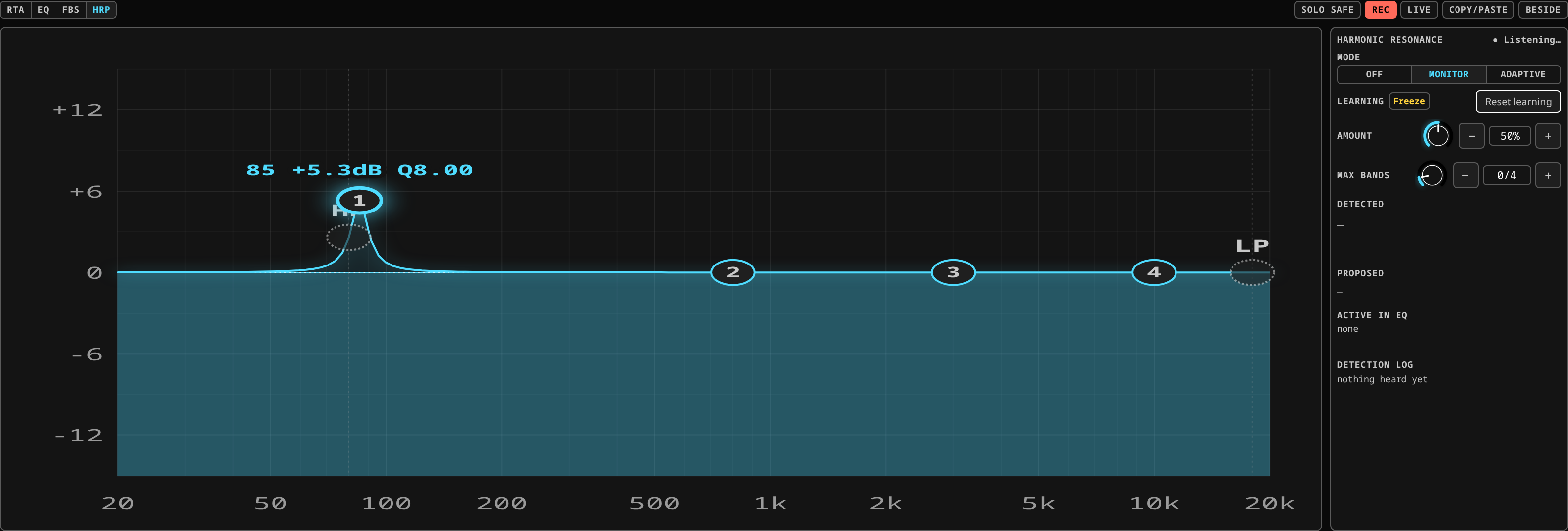 The harmonic processor armed in Monitor on a channel with no signal: the header reads Listening, the amount and the band budget are live, and the detected, proposed and active blocks stay empty until the analyser hears something. Adaptive adds the correction; Monitor only listens.
The Analysis chip in the channel view's CHANNEL block, on its HRP row (alongside Align and FBS, which share the same chip). It is offered on input channels; a bus has no harmonic processor, so the row is simply not there.
Off, the panel is just the switch and the mode ladder. The header reads Harmonic resonance · Off and there is nothing else to see, because nothing is being measured. Everything described below appears the moment you turn HRP on.
On, off, and the two modes
The HRP switch at the top of the panel says whether it is running — the same switch every other stage on the channel view has. Turning it off releases any corrections it had planted; turning it back on returns it to the mode it was last in, or Monitor if it has never run.
| Mode | What it does |
|---|---|
| MONITOR | Analyses and shows — the note, its harmonics, and the cut it would make. Never touches the EQ. |
| ADAPTIVE | Applies safe corrections by itself when a note is stable and a harmonic sticks out. |
Monitor is not a lesser mode; it is the one to start in. The number it shows under Proposed is the exact cut Adaptive would plant, computed the same way, so nothing surprising happens when you move the switch. Picking a mode while HRP is off turns it on and puts it in that mode, one gesture.
Reading the panel
The panel answers four questions, top to bottom, and they cannot disagree with each other because each comes from a different place.
Detected — the note, large, with its frequency small beside it and a confidence
percentage on the right. The note is what you glance at; A4 is what a musician says, and
440.2 Hz is not.
Under it, a row of small chips, one per harmonic: H1, H2, H3 … Hover or hold one for
its frequency, its measured level, and how far it is from what this instrument normally
does at this note. A dimmed chip is a harmonic that is not there — which is a different
fact from "very quiet", and only the first stops a correction. A chip marked ? is
ambiguous: two notes sounding together put their partials in the same place, the energy
belongs to both, and HRP will not make a strong cut into a note nobody complained about.
Proposed (or Correcting, in Adaptive) — the one harmonic it would act on, its frequency and the cut in dB. In Monitor there is an Apply button beside it: press it and the cut becomes your EQ band, which HRP will then leave alone forever.
Active in EQ — what is actually in the channel's EQ right now, read back from the EQ itself rather than restated. If this line is empty, nothing is cut, whatever the rest of the panel says.
Detection log — every note HRP heard, newest first, kept after it stops sounding. A
dim row is a note that was heard but was too brief or too unclear to act on; a ● means
it is sounding right now. The clear button clears this screen's log and nothing else.
The controls
| Control | What it does |
|---|---|
| HRP | On or off. Off releases every correction it had planted. |
| Mode | Monitor or Adaptive. |
| Amount | How hard it corrects, from 0 to 1. The default is 0.5. It is a musical control, not a threshold: turning it up does not remove the safety rules, it moves the correction within them. |
| Max bands | The most bands HRP may plant on this channel at once, 1 to 24. The default is 4. |
| Freeze | Stops HRP adapting and stops any new correction. Cuts already standing stay; the display keeps moving. |
| Reset learning | Forgets everything HRP has learned about this channel. |
Freeze is the live control. Press it before the passage you care about and HRP will not change its mind in the middle of it. Press it again afterwards. It is far more useful than turning HRP off, because the corrections you already have keep working.
Reset learning takes two presses — the first arms it, the second within a few seconds fires it. It clears the learned harmonic profile for this channel, forgets the notes it has been tracking, and releases the HRP cuts. Your own EQ bands and your FBS notches are not touched.
What it learns, and how long it takes
HRP builds a picture of what this instrument's harmonics normally look like at each note — not one average for the channel. The same instrument has a different harmonic balance at the bottom of its range than at the top, and one blurred-together profile would call the blur normal.
That has two consequences worth knowing:
- A note it has not heard enough of has no baseline, and HRP does nothing about it. No answer is the honest answer, and it will not guess. Play through the range you care about during soundcheck and it will be ready for the set.
- One bad measurement does not poison it. A mic bump or a chord that confused the attribution moves the stored figure by a fraction of a decibel, not by the whole difference.
What it will and will not do
- It cuts. It never boosts. A harmonic that is quieter than normal is not a problem HRP has an opinion about.
- It plants ordinary EQ bands, into the channel's own EQ, tagged as HRP. You can see them on the curve like any other band.
- It only ever touches its own bands. A band you placed by hand is never moved, re-shaped or removed — nor is a band FBS planted. That rule runs the other way too: FBS will not touch an HRP band.
- It is not source separation. When two notes share a partial it says so and declines rather than deciding.
- It needs the channel EQ switched in. With the EQ bypassed the corrections are still listed and are doing nothing, and the panel says so.
- It does not run on the audio path. The analysis rides behind the same spectrum the RTA uses, so arming it costs the mix nothing.
Using it
Soundcheck. Put the channel in Monitor and have the player go through the range — a scale, or just the parts. Watch the detection log fill. When a note comes up that you know is the problem one, look at what HRP proposes; if you agree, press Apply and it becomes your band and stops being HRP's business.
During the set. Adaptive, amount at the default, max bands at 4, and Freeze before anything you do not want touched. Look at Active in EQ afterwards: it is a list of what the instrument actually did tonight.
When you do not trust it. Monitor mode never touches audio. Leave it there for a whole show and read the log at the end; it costs nothing and tells you whether it would have been right.
Related
- EQ and dynamics — the EQ the bands are planted into.
- Feedback suppression — the other automatic planter, in the panel next door, solving a different problem.
- The analyser — the spectrum HRP reads.