Recording and virtual soundcheck
The console records itself. Every patched input, multitrack, at whatever rate the desk is running — and then plays those tracks back through the desk as if the band were still on stage.
That second half is the point. A virtual soundcheck lets you build a mix, ring out the room, or teach somebody the desk, at four in the afternoon with nobody on stage.
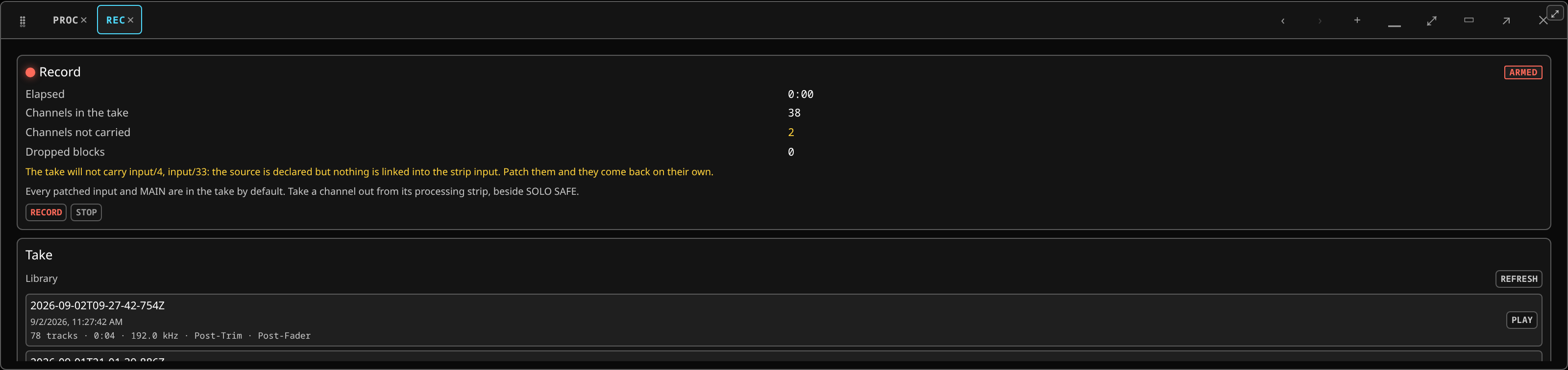 The recorder: the transport and the arm count, the take being held, and the soundcheck section under it.
Layouts ▸ Record opens the panel. The header also carries a REC button, so a take can be started and stopped without a panel open.
Arming
Every patched input is armed by default, plus MAIN. Aux and matrix outputs are not recorded unless you ask for them.
Choosing what goes in the take is done on the whole wall at once, the same way sends-on- faders is: switch the bay into record-arm mode and tap the strips out of the take that do not belong in it — the talkback channel, a spare, an effects return you can re-make later.
A channel that is armed but has nothing linked into its input cannot be recorded. The header's record controls carry an amber count of those channels; hover it for which ones. Patch them and they come back on their own.
What each channel records is a tap — a point in its signal chain:
| Tap | What it holds |
|---|---|
| Post-Trim | The input, after the head-amp and before everything else. This is the one a virtual soundcheck plays back. |
| Post-Fader | The channel as it went into the mix — your EQ, your dynamics, your fader ride. Stems for post-production. |
| Pre-Fader | The processed channel without the fader ride. An opt-in. |
The default is Post-Trim and Post-Fader together: the raw material for tomorrow, and the mix as you actually made it, in one take.
Recording
Press REC. The panel shows the number of armed channels, the elapsed time, and an xrun count if the machine drops anything.
The take records at the console's own rate, bit for bit. There is no converter in the capture path and there never will be — the samples in the file are the samples the desk mixed. That has an honest cost in disk: thirty-two tracks are roughly 22 GB an hour at 48 kHz, 44 at 96 kHz and 88 at 192 kHz. Choosing a high clock is choosing that.
The desk refuses to start a take it cannot finish. When it does, it says how much room it needed and how much there is — the disk figure appears at exactly that moment and at no other, because a free-space number sitting on screen going stale is worse than none.
The arm set is fixed when the take starts. A take has one channel set from beginning to end; arm or disarm during a take and it applies to the next one.
The take is stopped with a two-press STOP, so a stray finger during a set does not end the recording.
The record panel's phase chip says where the transport is: idle, armed, recording or stopping, and no recorder on a console with no capture engine, where the panel says so once rather than greying every control.
The take library
Stored takes are listed newest first, each with the date, the length, the rate, the number of tracks and which taps it holds. If you know a take's id you can also type it.
Up to five marks may appear on a take, and none of them implies the others:
- DROPS — the machine dropped frames while it was recording.
- n EMPTY — that many tracks came out at digital zero.
- n NOT CARRIED — that many channels were armed but nothing reached them, so the take holds no file for them.
- UNMEASURED (dashed) — tracks that carry no frame count, which the console cannot speak for either way.
- UNSEALED HEADER (amber) — the audio is all there and plays at its real length, but a file's header does not state that length yet, so another program reading it — a DAW, ffmpeg — would disagree about how long the show was. Nothing was lost, and the recorder's next start repairs it.
A clean take carries no mark at all, which is what makes a mark worth looking at.
Virtual soundcheck
Load a take, then Engage. The soundcheck's own chip reads no take, stopped or playing — or no soundcheck on a console with no playback engine. Every channel that has a track switches its source from the live input to the recording; the rest of the desk is untouched. Your faders, EQ, dynamics, sends, buses and outputs all work exactly as they do on a live band, because from the channel's point of view nothing has changed except where its audio comes from.
Play, and mix.
Per channel you can leave one strip live while the rest play back — a talkback mic, or the one instrument that turned up early.
EJECT is one big button and it is deliberately not confirmed. It is what you press when the band walks in and the room is still hearing yesterday. Nothing is lost: the take is on the disk and the mix is untouched.
The soundcheck is transient. It is not saved with the show and it does not survive a restart — a console that came up playing yesterday's recording into the PA would be a serious fault. The take library persists; loading one is always a deliberate act.
If it refuses to play
The take's rate must match the graph's. There is no resampler in the playback path. A take recorded at 96 kHz will not play into a graph running at 192 kHz, and the desk says so rather than playing it at the wrong speed. Either set the graph to the take's rate — see the clock — or convert the take when you load it, which the desk does offline, with a progress bar, before it engages.
Tracks that came out empty are skipped and named rather than being engaged into silence.
After the show
A take can be rendered with the harmonic processor run over it offline — the same engine as the live one, but with the whole file to look at and no real-time budget, so it can be far more thorough. The take keeps both the original and the render; nothing is overwritten.
Takes can also be exported for a DAW.
If you line the three taps up in a DAW on the same bar, they are sample-aligned with each other: the same moment in Post-Trim, Pre-Fader and Post-Fader is the same frame.
Related
- Scenes and sessions — saving the console itself, which is a different thing from recording its audio.
- The clock — the rate a take is made at.
- Metering and latency — the xrun counter.