Talkback and test signals
The built-in signal sources live in the Talkback module. It is not one of the default chips — add it from the header's LAYOUTS menu to put it on screen, or pop it into its own window.
The generators
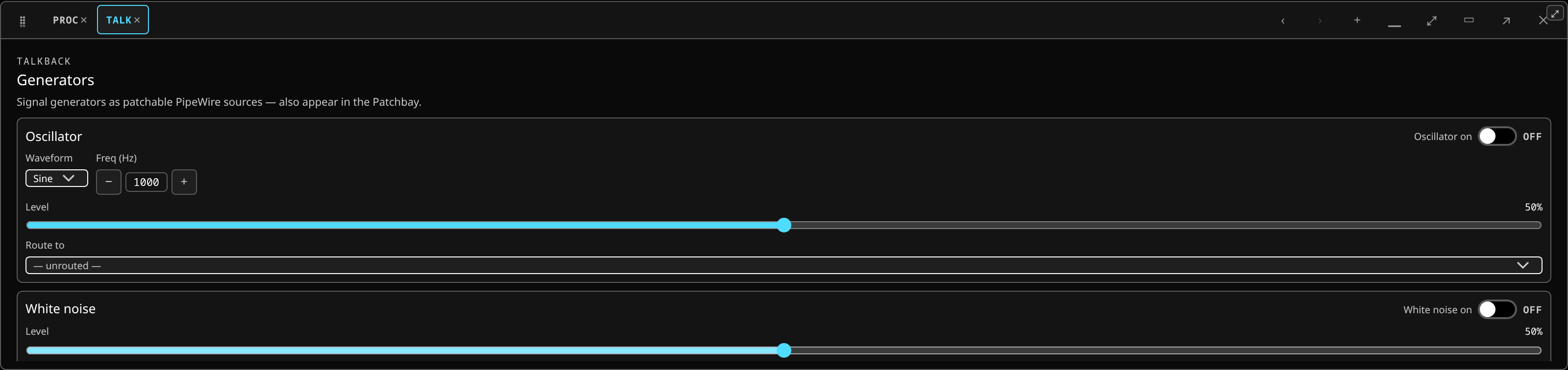 Talkback and the test generators: the oscillator and noise sources, and the talkback path into the buses.
- An oscillator — sine, square, saw or triangle, with a frequency and a level.
- White noise and pink noise.
Each switches on as a real PipeWire source and gets a Route to picker, so you can send it to any strip: a channel, a monitor, a talkback bus.
Because they are real sources they also appear in the patchbay, grouped under "Talkback / Generators", so you can crosspoint them anywhere you can crosspoint anything else.
What to use them for
- Ringing out a room — pink noise into the PA, then work the feedback suppression ring-out mode, or notch by hand.
- Checking a path — a sine at a known level tells you immediately whether a wedge, a delay tower or a matrix output is actually connected.
- Lining up a system — pink noise and a measurement microphone.
Set a sensible level before you route anything. Full-scale pink noise into a PA is a mistake you make once.
Talkback
A talkback-microphone slot sits alongside the generators, for routing a talkback input to where it needs to go — the monitor mixes, a specific wedge, the in-ears.
The routing is ordinary routing: the talkback source appears in the patchbay like any other and can be crosspointed to any channel or, more usually, sent to the buses that need it.
Do not leave it running
A generator is a real source and it stays on until switched off. It is worth a glance at the Talkback chip before doors.